Here, we have answered some of the most common questions about Meta leads.
What is the Meta Lead Ads integration with Voyado?
This integration automatically syncs leads collected via Facebook (Meta) Lead Ads directly into Voyado Engage, enabling real-time activation through email or SMS automation flows.
What data is transferred from Meta to Voyado?
The integration can transfer:
- First name and last name
- Email address
- Phone number
- Address data
- Personal data
- Custom fields
- Consent information
- Form
How quickly are leads synced to Voyado?
Leads are typically synced in real time or within a few minutes of being submitted on Facebook. This ensures you can trigger time-sensitive communication, such as welcome emails or limited-time offers.
What happens to leads once they’re in Voyado?
Leads are added as contacts in Voyado Engage. Based on how your automation flows are set up, you can:
- Trigger welcome journeys (email or SMS)
- Segment based on source (e.g., campaign name, form)
- Add to ongoing nurture flows
- Track engagement and conversion over time
Can I customize what happens after a lead is synced?
Yes! In Voyado, you can:
- Use automations to define follow-up steps (e.g., send a welcome email, wait 3 days, send reminder)
- Apply tags or custom attributes based on form or campaign
- Use segments to filter leads for specific campaigns
Is consent handled in the integration?
Yes. The integration can map and respect the opt-in choices submitted via the Facebook form (e.g., checkbox for email or SMS marketing). It’s essential that your form includes compliant consent language.
Is custom attributes handled in the integration?
Yes. The integration can map custom attributes from Meta in Engage, for example if you collect data that isn’t a part of Engages standard model.
Example: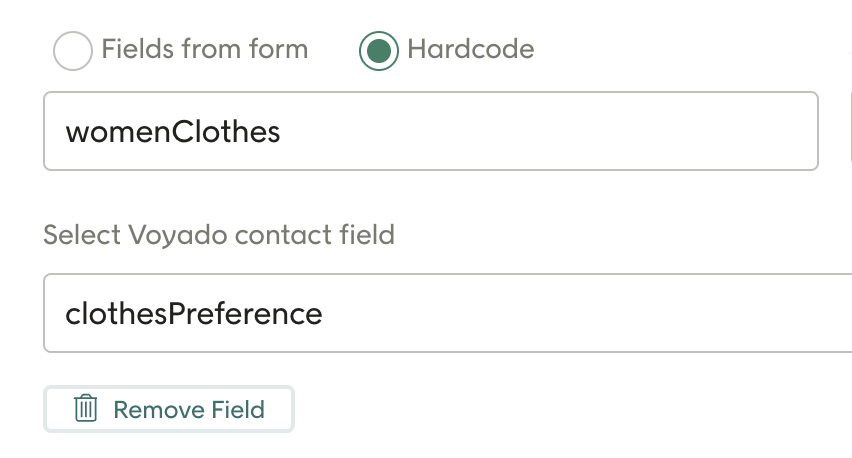
- "clothesPreference" is the name of the field in Engage
- "womenClothes" is the value of the field in Engage
Note: We do not support data type "multiple checkbox" on the contact field at the moment
Is multiple-select handled in the integration?
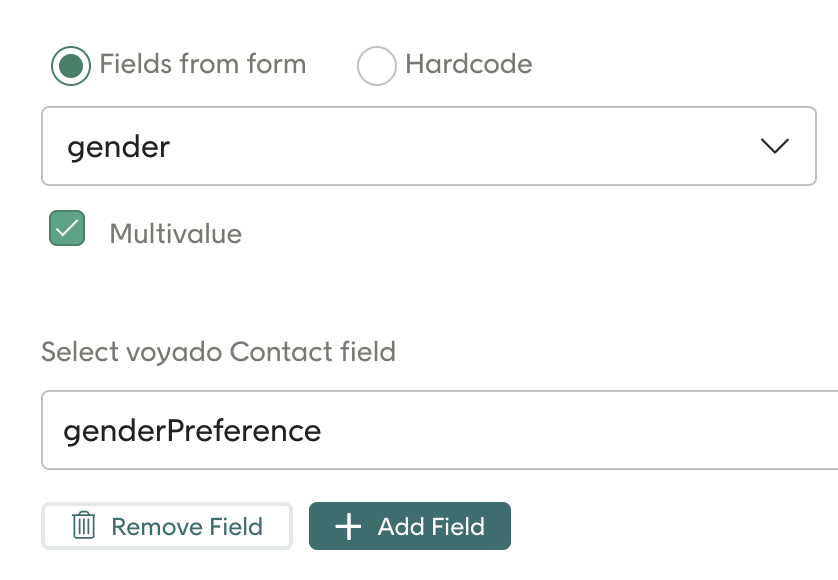
Yes. The integration includes that you can have a field in Meta & Voyado Engage that handles multiple values that will be sent towards Voyado Engage as an array. Select checkbox 'Multivalue' to send mutliple values to Voyado Engage. Note that the attribute in Voyado Engage needs to be a type 'CheckboxMultiple' - if it's not, dont select the 'Multivalue' checkbox.
What contact types does the integration support?
Contact type Member and contact type Contact.
Do I need to set up the attribute customSource myself?
Yes, you need to do this yourself in Config Hub.
Can I track what form the customer comes from?
Yes, you can set up a field called customSource in Voyado Engage, which you also will be able to map in the configuration area in Lead Ads config. You will also be able to track if a customer comes from Meta in general.
How do I set up the integration?
The setup process may involve:
- Connecting your Meta Business account to the integration.
- Selecting which Lead Ad forms to sync.
- Mapping Meta form fields to Voyado contact fields.
- Testing the sync to ensure data flows correctly.
Read more here: Link to “How to get started”
Do I need technical skills to use the integration?
No coding is required once the integration is live. However, the initial setup may involve some configuration.
Can I track performance of these leads in Voyado?
Yes. You can measure:
- Email/SMS engagement (opens, clicks)
- Conversions and purchases
- Which campaigns or forms generate the most valuable leads
What’s the benefit of using this integration?
- Real-time activation of leads
- Improved conversion through immediate follow-up
- Centralized customer data in Voyado
- Less manual work — no more exporting/importing leads
- Better segmentation and targeting from ad to inbox
What is the cost for using the integration?
No extra cost related to the integration as of today
- You need the Online ads license where Meta Leads is included
- An onboarding cost may be applied
Article last reviewed
Comments
0 comments
Please sign in to leave a comment.